Switches between the light and dark themes, at the end of every page's header. Follows the system until used; the choice is then remembered (ADR-0005).
Selectors
.theme-toggle
States
not pressed (light theme shown)
pressed (dark theme shown; the disc turns over on --duration-normal)
hover (border darkens)
focus-visible
narrow screens (below 48rem): 42px touch target, centred on the nav's line
hidden without JavaScript: the theme then follows the system
Accessibility
A <button type="button"> named “Dark theme” (visually hidden text, the icon is aria-hidden), its state in aria-pressed, so screen readers say “Dark theme, toggle button, pressed”.
aria-pressed reflects the theme shown, whether it comes from the system or the visitor's choice, and updates when the system changes.
The stored theme is applied in <head> before the stylesheet, so there is no flash of the other theme.
Hidden with @media (scripting: none): no dead button without JavaScript.
Do
Render it with themeToggle(); every .theme-toggle on a page acts on the same theme.
Don't
Don't change the label with the state: the name stays “Dark theme”, aria-pressed carries the state.
Don't print the chosen theme: dark tokens are screen-only.
Card
A case study teaser in the “Selected work” grid: cover, eyebrow, title, summary, impact.
hover / focus-within (accent border, card lifts by --lift-md, the cover's detail rises by --lift-lg)
contract open: construction lines, no lift, only the title links (see Card contract)
portrait cover (centred at 56% width, cut by the bottom edge)
wide cover (anchored left at 220% width, cut by the right edge)
Accessibility
One link per card, on the title; its ::after stretches the hit area over the whole card.
The “View contract” toggle comes after the <article>, so the article holds the teaser only.
The focus ring is drawn around the card, through that ::after.
The cover keeps the alt text written in the content.
Do
Wrap cards in .cards (a <ul>), one <li class="card"> each.
Use cardCover for one readable UI detail (a form, a component, a phone screen), cropped to the UI itself; the case study keeps its full screenshot in cover.
Let the cover's shape pick the rule: taller than wide is .is-portrait, otherwise .is-wide.
Don't
Don't add a second link or control inside a card, except the “View contract” toggle: the stretched link would cover it.
Don't use a full page or a device mockup as a card cover, and don't zoom it on hover.
Instead of a rewrite, a revamp — a legacy Rails monolith moved toward modern Rails and Hotwire, the mobile apps brought onto the same codebase, and booking pages made to feel faster.
front-end bundle size
−40%
average, critical booking pages
−1.3 s
{ } View contract
A case study teaser in the “Selected work” grid: cover, eyebrow, title, summary, impact.
One link per card, on the title; its ::after stretches the hit area over the whole card.
The “View contract” toggle comes after the <article>, so the article holds the teaser only.
The focus ring is drawn around the card, through that ::after.
The cover keeps the alt text written in the content.
Contrast
--color-fg on --color-surface ≥ 4.5: title and summary
--color-muted on --color-surface ≥ 4.5: eyebrow and impact labels
Don't
Don't add a second link or control inside a card, except the “View contract” toggle: the stretched link would cover it.
Don't use a full page or a device mockup as a card cover, and don't zoom it on hover.
From src/system/contracts.ts · checked by
tests/system.test.ts ·
Card on /system
Card contract
“View contract” on a card: opens the Card contract the card was built from, and draws construction lines on each part, labelled with its class.
Selectors
.card-contract.card-contract-panel
States
closed: a mono pill at the card's bottom right
hover (accent text and border)
focus-visible
opening / closing: the panel unfolds, fades and slides down over --duration-slow, and the { } opens up (instant under reduced motion, or where ::details-content is unsupported)
open: accent pill; the panel opens below it; every data-part gets crossing corner lines and a mono label; the card stops lifting and only its title links
Accessibility
A native <details> / <summary>: keyboard operable, announced as “View contract, collapsed / expanded”, and it works without JavaScript.
The { } is aria-hidden, so the name is “View contract” alone.
The labels are CSS content with empty alternative text (/ ""), so headings keep their names. The panel's Selectors row carries the same information.
The summary and the panel sit above the stretched card link (z-index: 1), so they can be clicked.
Do
Render the panel from the contract with workCard(work, root, contract), never by hand, so it can't drift.
Label each part with data-part, set to a class the element has and a contract owns (a test checks both).
Don't
Don't reuse .contract: that is the /system entry, with its top border.
Don't animate the lines: the open card holds still.
First in-house engineer on a from-scratch rebuild of the B2C booking site, alongside a team of consultants. Developer, Scrum Master and facilitator — and, for months, a bit of the missing roles too.
people on the team
21
in-house engineer
1st
{ } View contract
A case study teaser in the “Selected work” grid: cover, eyebrow, title, summary, impact.
One link per card, on the title; its ::after stretches the hit area over the whole card.
The “View contract” toggle comes after the <article>, so the article holds the teaser only.
The focus ring is drawn around the card, through that ::after.
The cover keeps the alt text written in the content.
Contrast
--color-fg on --color-surface ≥ 4.5: title and summary
--color-muted on --color-surface ≥ 4.5: eyebrow and impact labels
Don't
Don't add a second link or control inside a card, except the “View contract” toggle: the stretched link would cover it.
Don't use a full page or a device mockup as a card cover, and don't zoom it on hover.
From src/system/contracts.ts · checked by
tests/system.test.ts ·
Card on /system
Eyebrow
A short uppercase label above a title: client and period, or “Next”.
Selectors
.eyebrow
Accessibility
A plain paragraph, before the heading it introduces; uppercase is CSS only.
Don't
Don't use it as a heading.
Rail Europe · 2025 — now
Impact
Measured results of a case study: a big figure and what it measures.
Selectors
.impact.impact-item
Accessibility
A <dl> labelled “Impact”: the label (dt) comes before the figure (dd) in the source, the figure is shown first with column-reverse.
Figures use tabular numbers.
Do
Only figures with a source: the resume, or a before/after measurement.
Don't
Don't round or invent numbers to fill the row.
front-end bundle size
−40%
average, critical booking pages
−1.3 s
Tags
The stack of a case study, as small outlined pills.
Selectors
.tags.tag
Accessibility
A <ul> labelled “Stack”, so it is announced as a list.
Don't
Don't make tags interactive: they are not filters.
Ruby on Rails
Hotwire
Turbo
Stimulus
Capacitor
TypeScript
Screenshot
A WebP screenshot with an optional dark-mode variant and caption.
Selectors
.case-cover.shot.gallery
States
light
dark (swapped with prefers-color-scheme when a dark shot exists)
Accessibility
Alt text is required by the content schema; the build fails without it.
Width and height come from the file, so images don't shift the layout.
Lazy-loaded, except the cover of a case study.
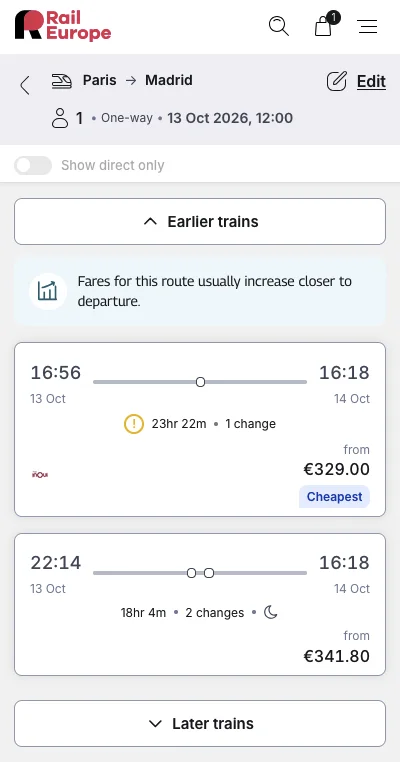
Search results on mobile.
Hero
The top of the home page: name and role (the h1), tagline, intro and the call to action.
Selectors
.hero.hero-name.hero-role.tagline.intro
Accessibility
The h1 holds the name and role; the tagline is a paragraph styled large.
Only on the home page, since it holds the h1; the example shows the tagline and intro only.
The résumé header reuses .hero-name and .hero-role for its own h1.
I build design systems, polished UI, and the guardrails that let teams — and agents — ship them.
Ten years shipping production frontends, from startup studios to the booking funnel of Rail Europe. I care about the last 10% (interaction details, accessibility, perceived speed) and about making the right path the easy one for whoever builds next.
Practice
One way of working, in the “How I work” grid.
Selectors
.practices.practice
Accessibility
Each practice is a list item with an h3, under the section's h2.
Design systems, for humans and agents
Tokens, documented components and Storybook as a shared language between design and code. Now making them readable by AI agents too — starting with this site.
CTA banner
The closing call to action of the home page: a question, one line, and a Button to the résumé, on a flat surface.
Selectors
.cta-banner
States
wide (text left, button right)
phone (button below the text, centred)
Accessibility
A <section> labelled by its h2, like the other home sections.
The action is a Button on an <a>, since it navigates to the résumé.
Don't
Don't add a border or a second action: one question, one button.
Want the full picture?
Every role, project and skill on one page, ready to print.
The Markdown body of a case study or a post, at a readable line length.
Selectors
.prose
Accessibility
Headings in the Markdown start at h2, under the page's h1.
Code blocks wrap instead of scrolling sideways, so they never need a horizontal scroll or a keyboard stop.
Rail Europe sells train tickets across Europe. Its customer-facing site was a
Rails monolith more than ten years old, with layers of frontend history:
CoffeeScript, jQuery, Sass, AJAX-driven partials, and a separate React SPA plus
an API that mainly served the mobile apps.
Layout
Page
Page frame: centred column, header, sections, and the footer of every page: copyright on the left, Social links on the right; stacked and centred below 48rem.
One h1 per page, headings never skip a level, <html lang="en">.
Sections are labelled by their heading (aria-labelledby).
Light and dark themes follow prefers-color-scheme until the visitor uses the Theme toggle.
Every page has a header <nav aria-label="Main"> (Home, Writing once a post is published, CV, System); below 48rem its items sit --space-4 apart instead of --space-6; the current page has aria-current="page" and stays underlined, so it doesn't rely on colour.
Case study
The structure of a case study page: back link, header, cover, impact, prose, links, next.
Selectors
.case.back.case-header.case-links.next
Accessibility
The “Next case study” block is a <nav> with its own label.
Writing
The /writing index (posts newest first) and a post page (back link, case-study header, prose). Not built until a post is published.
Selectors
.post-item
Accessibility
The index is an ordered list; each title is an h2 link under the page's h1.
Dates are <time datetime> elements, so they're machine-readable.
A post is an <article> inside main.
Don't
Don't publish a post with open notes for Antoine: the build warns about them.